> ## Documentation Index
> Fetch the complete documentation index at: https://docs.incident.io/llms.txt
> Use this file to discover all available pages before exploring further.
# Announcing private incidents
> Announce private incidents to a controlled audience.
By default, [private incidents](/incidents/private-incidents) are never announced. Both announcement rules and workflows skip them, so sensitive details don't end up in a channel everyone can read.
But there are good reasons to announce a private incident to a **controlled** audience. A security team might keep a private `#security-incidents` channel where every private security incident is announced, so members can see what's happening and [self-join](/incidents/private-incidents#grant-access-to-a-team) the ones they need to, all without exposing the incident to the wider organization.
You can announce private incidents across three surfaces: [announcement rules](#announcement-rules), [workflows](#workflows), and using [`/inc announce`](#inc-announce).
Announcing a private incident posts it to whatever channel you choose. **Anyone in that channel can see the
announcement, including people who aren't part of the incident**. Choose a channel whose members should be allowed to
know about the incident. We recommend a private channel scoped to the team that has access.
## Permissions
Configuring an announcement rule or workflow to announce private incidents requires the **Manage announcement rules that run on private incidents** permission. People without it can still create and edit ordinary announcement rules and workflows. They just can't turn on private-incident announcements, or edit a rule or workflow that already has it enabled.
Announcing manually with `/inc announce` is available to anyone who's already a member of the incident. See [user roles and permissions](/admin/user-permissions).
## Announcement rules
[Announcement rules](/incidents/change-announcements) decide where incidents get announced. To control whether a rule announces private incidents, set its private-incident scope when you create or edit it in **Settings → [Announcements](https://app.incident.io/~/settings/announcements)**. You have three options:
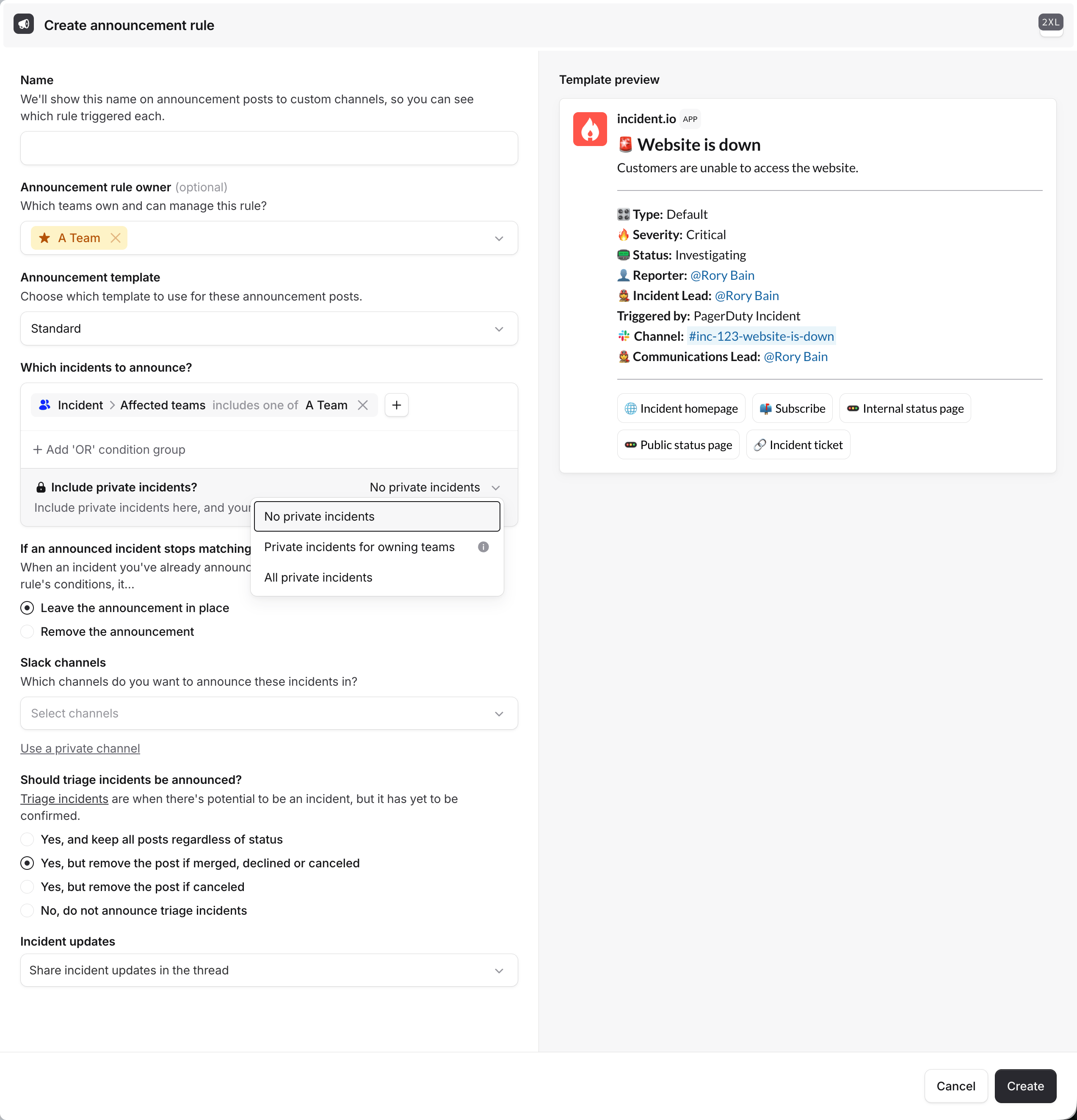 * **No private incidents** (the default): the rule only announces public incidents.
* **Private incidents for owning teams**: the rule also announces any private incident that at least one of its [owning teams](/admin/restrict-announcement-management) can access.
* **All private incidents**: the rule announces every incident, public and private.
If an [incident type](/incidents/incident-types) is private by default, its incidents are only announced by rules
whose private-incident scope includes them (**Private incidents for owning teams** or **All private incidents**).
Otherwise they're announced only if they're later made public.
## Workflows
Use the **Post an incident announcement** [workflow step](/incidents/private-incident-workflows) to announce incidents as part of a workflow. By default the step skips private incidents; turn on **Announce private incidents** to include them.
This is useful when you want to announce based on conditions, or alongside other automated actions (like granting a team access at the same time). See [workflows on private incidents](/incidents/private-incident-workflows).
## `/inc announce`
To announce a private incident manually, run `/inc announce` in the incident channel and choose where to post it. This is handy for one-off announcements that aren't covered by a rule, like looping in a specific team's channel as an incident develops.
## Control how updates are shared
When you announce an incident, you also choose how its [status updates](/incidents/status-updates) are shared afterward. This matters even more for private incidents, where you may want the announcement to be discoverable without streaming every update into the channel.
| Option | What happens |
| ------------------------------------------------ | -------------------------------------------------------------------------------------------------- |
| **Don't share incident updates** | Only the initial announcement is posted. Updates stay in the incident channel. |
| **Share incident updates to thread only** | Updates are added as replies in the announcement's thread. |
| **Share incident updates to channel and thread** | Updates are posted to the channel and the thread, so they're visible without expanding the thread. |
You can set this on announcement rules and on the **Post an incident announcement** workflow step.
## Related
* [Private incidents](/incidents/private-incidents): make incidents private and manage access
* [Workflows on private incidents](/incidents/private-incident-workflows): announce and grant access via workflows
* [Announcement rules](/incidents/change-announcements): control where incidents get announced
* [Announcement posts](/admin/announcements): customize what an announcement contains
* **No private incidents** (the default): the rule only announces public incidents.
* **Private incidents for owning teams**: the rule also announces any private incident that at least one of its [owning teams](/admin/restrict-announcement-management) can access.
* **All private incidents**: the rule announces every incident, public and private.
If an [incident type](/incidents/incident-types) is private by default, its incidents are only announced by rules
whose private-incident scope includes them (**Private incidents for owning teams** or **All private incidents**).
Otherwise they're announced only if they're later made public.
## Workflows
Use the **Post an incident announcement** [workflow step](/incidents/private-incident-workflows) to announce incidents as part of a workflow. By default the step skips private incidents; turn on **Announce private incidents** to include them.
This is useful when you want to announce based on conditions, or alongside other automated actions (like granting a team access at the same time). See [workflows on private incidents](/incidents/private-incident-workflows).
## `/inc announce`
To announce a private incident manually, run `/inc announce` in the incident channel and choose where to post it. This is handy for one-off announcements that aren't covered by a rule, like looping in a specific team's channel as an incident develops.
## Control how updates are shared
When you announce an incident, you also choose how its [status updates](/incidents/status-updates) are shared afterward. This matters even more for private incidents, where you may want the announcement to be discoverable without streaming every update into the channel.
| Option | What happens |
| ------------------------------------------------ | -------------------------------------------------------------------------------------------------- |
| **Don't share incident updates** | Only the initial announcement is posted. Updates stay in the incident channel. |
| **Share incident updates to thread only** | Updates are added as replies in the announcement's thread. |
| **Share incident updates to channel and thread** | Updates are posted to the channel and the thread, so they're visible without expanding the thread. |
You can set this on announcement rules and on the **Post an incident announcement** workflow step.
## Related
* [Private incidents](/incidents/private-incidents): make incidents private and manage access
* [Workflows on private incidents](/incidents/private-incident-workflows): announce and grant access via workflows
* [Announcement rules](/incidents/change-announcements): control where incidents get announced
* [Announcement posts](/admin/announcements): customize what an announcement contains